
FPS Profiler & Safe Dry-Run Simulator
Mobile devices have constrained CPU and memory. Running a slow SQLite query on the UI thread drops frames and ruins user experience.
VetroLog provides two dedicated tools to measure and safeguard database operations: The Mobile 60 FPS Profiler and The Safe Dry-Run Simulator.
⚡ 1. Mobile 60 FPS UI Thread Profiler
Every modern mobile OS targets 60 frames per second (FPS) or higher:
- At 60 FPS, the app has a strict frame budget of 16.6 milliseconds (ms) per frame.
- At 120 FPS (ProMotion / modern Android displays), the budget drops to 8.3 ms.
- If a database query takes longer than 16ms on the main thread, the app skips frames—causing visible stutter and jank.
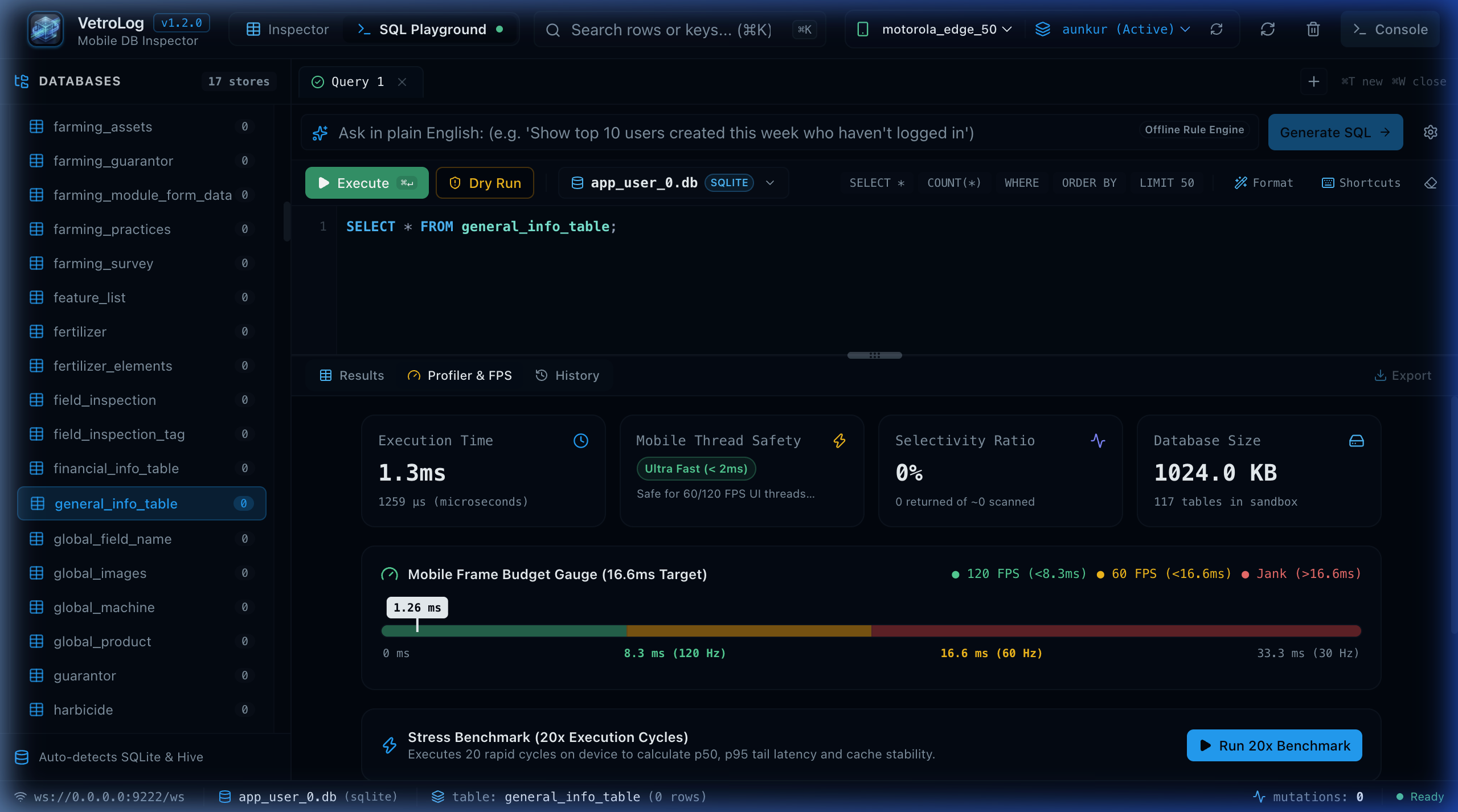
Frame Budget Status Thresholds
Switch to the Profiler & FPS tab to see your query mapped against the budget:
| Status | Latency Range | Impact on Mobile App |
|---|---|---|
| 🟢 Smooth (60 FPS Safe) | < 8.0 ms | Excellent: Query executes well within a single frame. Safe for synchronous or UI-thread execution. |
| 🟡 Frame Budget Warning | 8.0 ms – 16.6 ms | Warning: Approaching the frame boundary. Can cause dropped frames if any complex UI layout happens in the same frame. |
| 🔴 Jank Alert (Dropped Frames) | > 16.6 ms | Critical: Guaranteed UI freeze. Must be moved to a background isolate (Flutter compute), worker thread (Android Coroutines), or optimized with indexes. |
🛡️ 2. Safe Transaction Dry-Run Simulator
Accidentally executing an unconstrained UPDATE or DELETE query can wipe out test data or corrupt the mobile database.
The Dry Run simulator lets you test mutating queries safely before committing them to your phone:
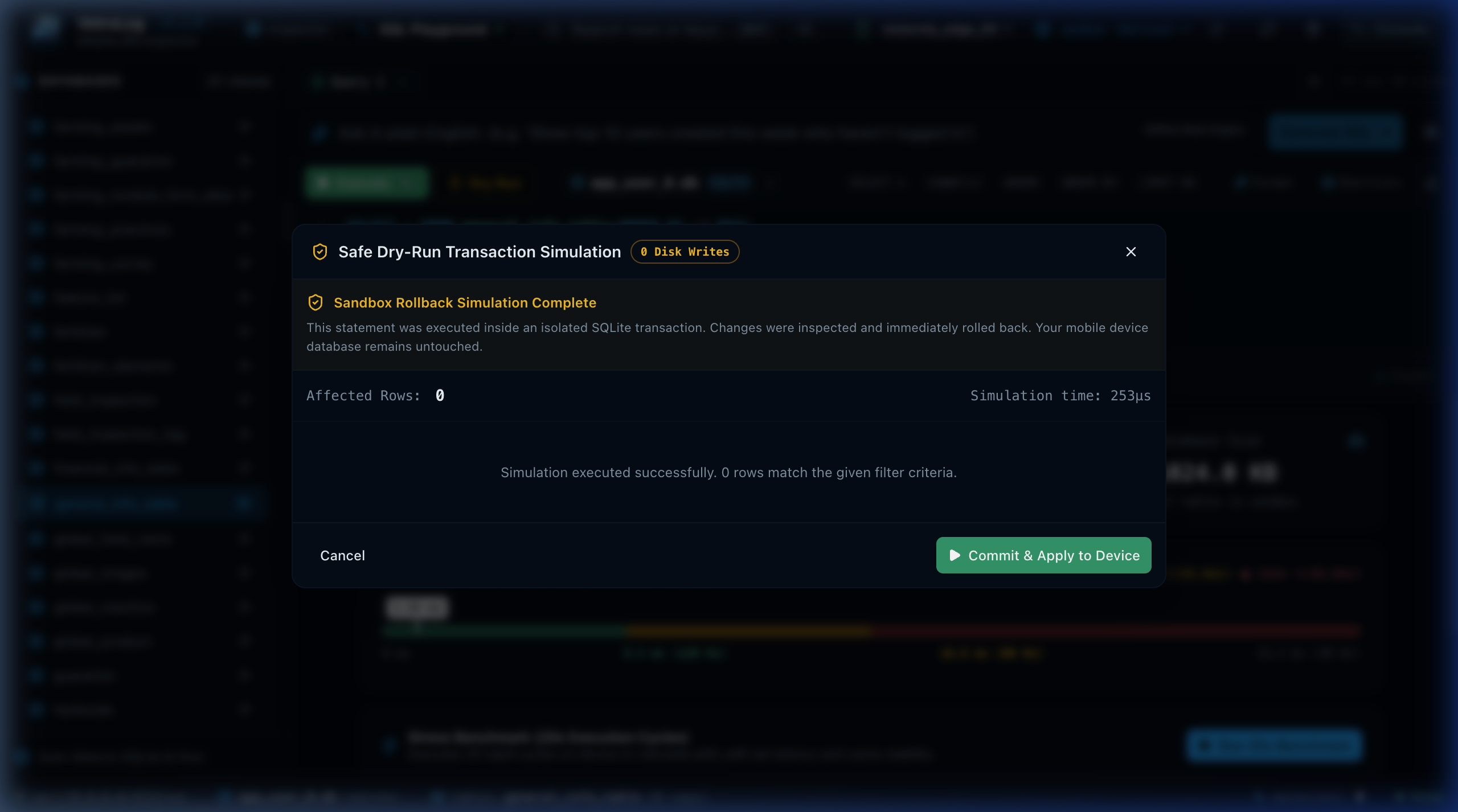
How Dry-Run Operates Under the Hood
When you click Dry Run:
- Transaction Savepoint: VetroLog wraps your query inside an isolated SQLite savepoint:
SAVEPOINT vetrolog_dryrun;
- Execute Mutation: Runs the
INSERT,UPDATE, orDELETEquery. - Inspect Affected Rows: Captures the exact number of rows that would be changed, along with the execution latency.
- Mandatory Immediate Rollback:
ROLLBACK TO vetrolog_dryrun;RELEASE SAVEPOINT vetrolog_dryrun;
- Detailed Safety Summary: Displays a modal showing:
- Rows Affected: Exactly how many records match your criteria.
- Execution Latency: Time required to process the mutation.
- Verdict: Clean verification that zero bytes were permanently modified on your phone.
Next Steps
- Export your tested queries into production code with the Multi-Platform Code Generator.