
Intelligent SQL Console & Autocomplete
The SQL Playground is a full-featured, developer-centric SQL environment tailored specifically for mobile databases.
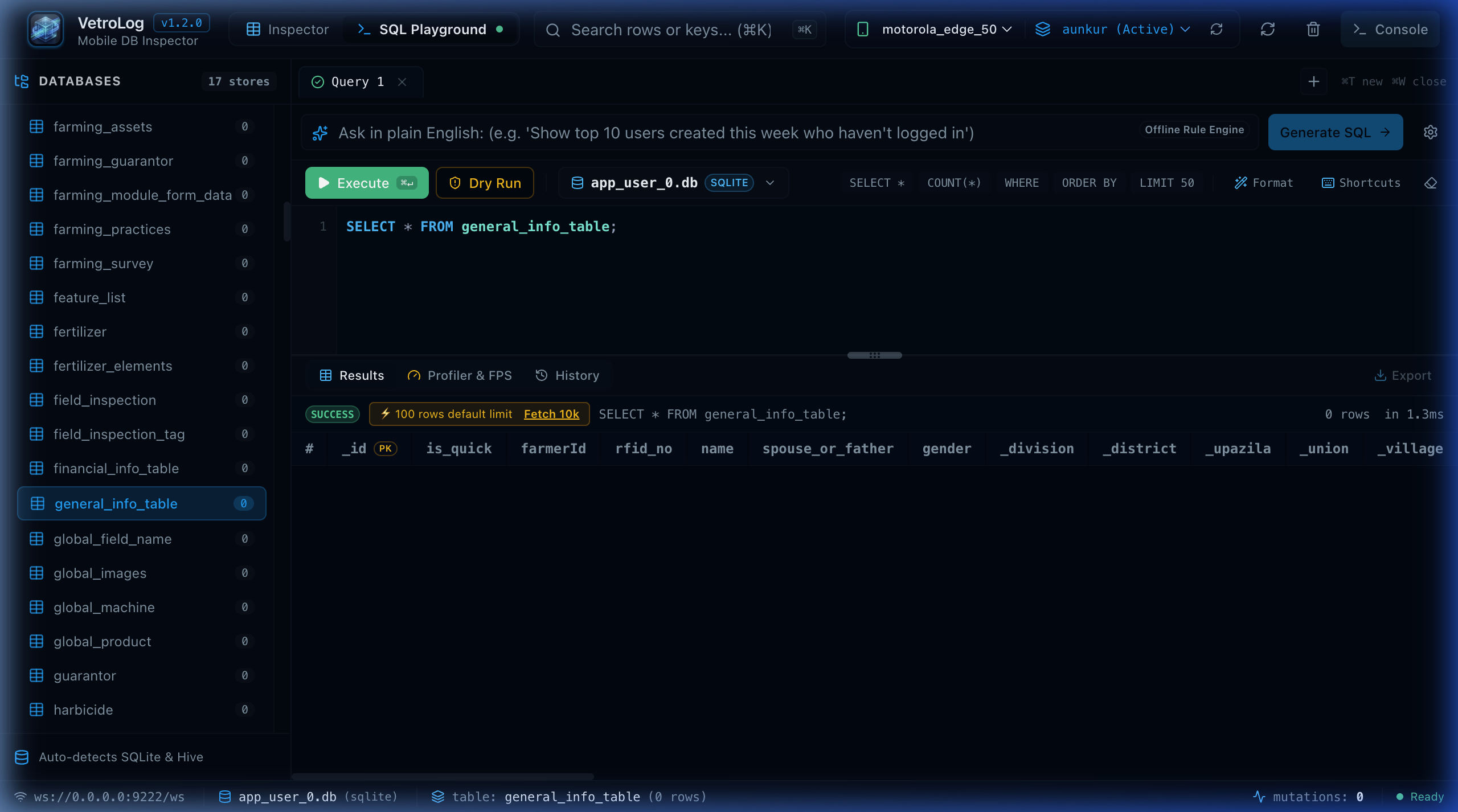
🎬 Interactive SQL Playground Tour
📑 Multi-Tab Query Strips
Work on multiple queries simultaneously without losing context:
- Open New Tabs: Click the
+button or press⌘T/Ctrl+T. - Rename Tabs: Double-click any tab title (e.g. changing
Query 1toActive Farmers). - Close Tabs: Click the
×icon or press⌘W/Ctrl+W. - Persistent State: Tabs, queries, and results are automatically preserved across app restarts in local storage.
🗄️ Database Dropdown Selector
When inspecting applications with multiple SQLite databases (e.g. an app using separate databases for user data, offline telemetry, and sync queues):
- Each tab features a floating Database Dropdown Selector in the query toolbar (e.g.
🗄️ app_user_0.db (SQLITE)). - You can switch which database a query executes against without affecting your other open tabs.
- Switching tabs automatically synchronizes the active database context in the sidebar.
🧠 Schema-Aware Autocomplete & Dot-Notation
VetroLog includes an intelligent autocomplete engine that understands your database schema:
SELECT f. ├── _id ├── farmerId ├── name ├── phone └── village- Table Suggestions: Type
SELECT * FROMto see a dropdown of all tables in the active database. - Dot-Notation Aliases: Type
SELECT f.after declaringFROM farmers fto see columns belonging exclusively tofarmers. - Foreign Key Predictor: Typing
JOINsuggests valid join clauses matching defined foreign keys.
⚡ Keyboard Shortcuts Cheat Sheet
Press the Shortcuts (⌨️) button or ⌘/ to view all keyboard shortcuts:
| Shortcut (macOS) | Shortcut (Windows/Linux) | Action |
|---|---|---|
⌘ + Enter | Ctrl + Enter | Execute the active SQL query |
⌘ + T | Ctrl + T | Open a new query tab |
⌘ + W | Ctrl + W | Close current query tab |
⌘ + K | Ctrl + K | Focus search & filter bar |
⌥ + ⇧ + F | Alt + Shift + F | Auto-format & beautify SQL syntax |
⌘ + \ | Ctrl + \ | Toggle bottom panel (Results / Plan / Advisor) |
🛡️ Default Limit Guard (100 Rows)
To prevent accidental queries like SELECT * FROM large_log_table from overwhelming mobile memory or freezing the UI:
- VetroLog automatically injects a non-destructive
LIMIT 100if noLIMITclause is specified. - A banner notifies you:
⚡ 100 rows default limit. - Click
Fetch 10kto pull up to 10,000 rows whenever full exports are required.
Next Steps
- Visualize SQLite execution plans in the Visual Query Plan guide.
- Generate queries in plain English with Natural Language AI (Gemini 2.5).